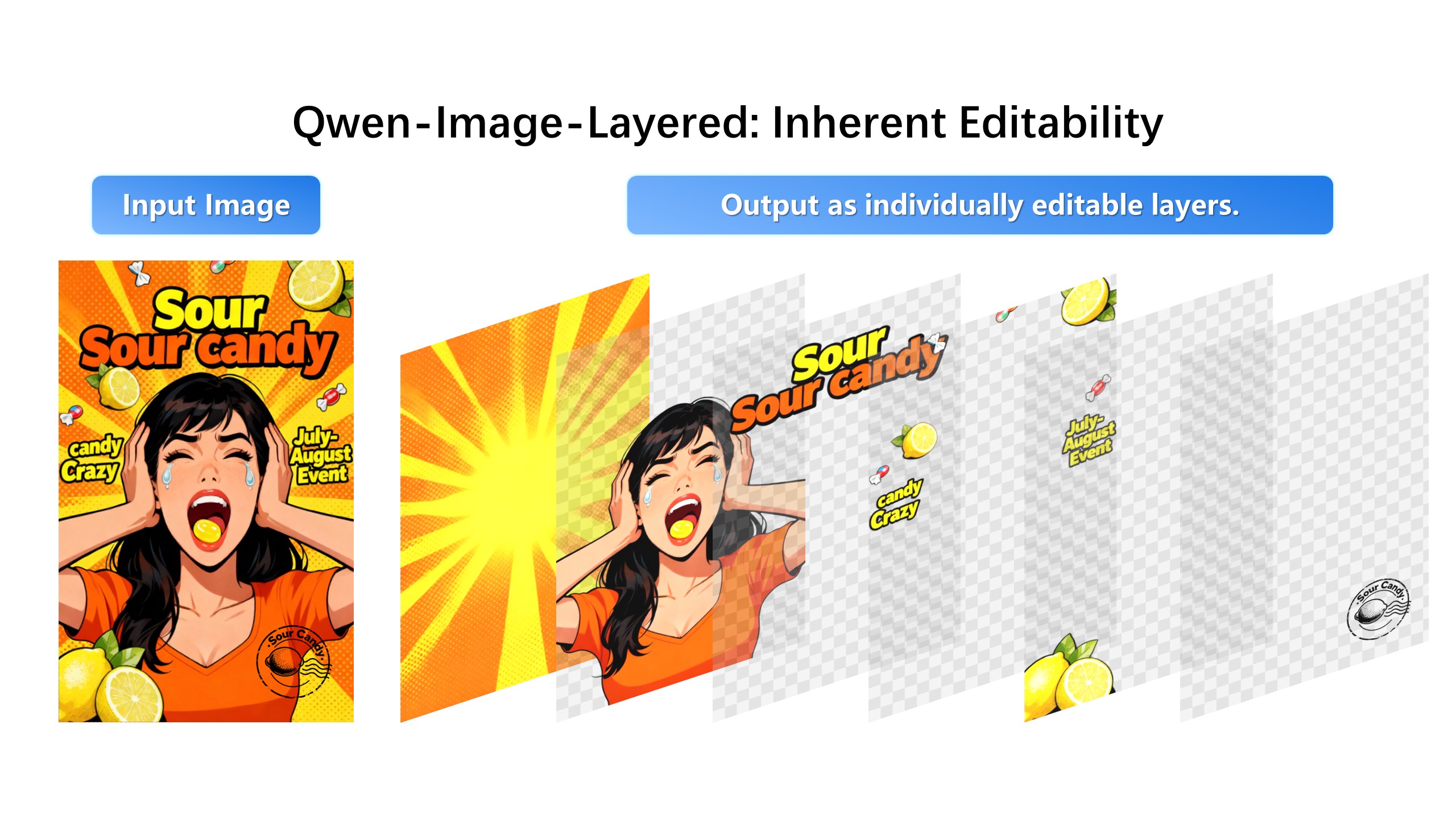
AI Photoshop for Posters
Image Layered turns flat images into editable layers, so you can change text, replace products, remove objects, and redesign posters with AI.
Our advanced AI-powered editor provides professional-grade separation of image elements into editable layers. Perfect for redesigning posters, product photography, e-commerce, and digital marketing.
Advanced AI algorithms automatically identify and separate different elements in your image, creating precise layers for backgrounds, products, text, and objects.
Edit each layer independently with AI-powered tools including recoloring, object replacement, background removal, and intelligent inpainting.
Export your layered compositions in multiple formats including PNG with transparency, PSD for Photoshop, and high-resolution JPG for web use.
From e-commerce product photography to graphic design and marketing, our AI image layering solution adapts to your specific workflow needs.
Separate products from backgrounds, create consistent product catalogs, and generate multiple background variations for your online store.
Extract design elements, create reusable assets, and streamline your creative workflow with intelligent layer separation.
Create dynamic ad variations, A/B test different backgrounds, and optimize visual assets for various marketing channels.
Produce engaging social media content with separated elements, enabling endless creative possibilities for posts and stories.
AI image layering is an advanced technology that uses deep learning and computer vision to automatically separate different elements within an image into individual, editable layers. Our tool analyzes visual patterns, edges, colors, and semantic context to identify distinct objects such as products, backgrounds, text, and decorative elements. Each element is then extracted onto its own layer, allowing you to manipulate them independently. This process, which traditionally required hours of manual work in Photoshop, is now completed in seconds with professional-grade accuracy.
Our AI image layering tool supports the most common web and print image formats including JPG (JPEG), PNG (with transparency support), and WEBP (modern web format). We recommend using high-resolution images (minimum 1024x1024 pixels) for optimal layer separation results. The tool works best with images that have clear visual separation between elements, good lighting, and distinct color contrasts. Maximum file size is 10MB per image, and we support both RGB and CMYK color modes for comprehensive workflow integration.
You can decompose your images into anywhere from 1 to 20 separate layers, depending on the complexity of your image and your specific needs. Simple product images might only need 2-3 layers (product, background, shadow), while complex scenes with multiple objects can be separated into 10-15 layers for maximum editing flexibility. The AI automatically detects the optimal number of layers based on the visual content, but you can also manually specify the desired layer count. Each layer is generated with precise edges and can be independently adjusted for opacity, position, and blending modes.
Yes, we take data security and user privacy extremely seriously. All uploaded images are processed using enterprise-grade encryption during transfer and storage. Your images are processed on secure servers and are automatically deleted within 24 hours of processing completion. We do not use your images for training our AI models without explicit consent. Our infrastructure complies with GDPR, CCPA, and other major data protection regulations. Payment information is processed through PCI-compliant payment processors, and we never store your credit card details on our servers.
Our comprehensive layer editing toolkit includes professional-grade features such as AI-powered recoloring that maintains natural lighting and shadows, intelligent object replacement that seamlessly integrates new elements, background removal with automatic edge refinement, and content-aware inpainting for removing unwanted objects. Each layer can be independently adjusted for opacity (0-100%), position (with snap-to-grid alignment), and blending modes (multiply, screen, overlay, etc.). You can also duplicate layers, delete unwanted elements, and rearrange the layer order with simple drag-and-drop functionality.
Exporting your work is flexible and straightforward. Choose from PNG format with full transparency support for web graphics and overlays, high-resolution JPG for print and social media, or PSD (Photoshop Document) format that preserves all layers for further editing in Adobe Photoshop and other professional design software. You can export individual layers or the complete composition. The export dialog allows you to specify exact dimensions, resolution (DPI), and quality settings. Batch export is available for processing multiple projects at once, making it ideal for large product catalogs and marketing campaigns.
Absolutely! Our AI image layering tool is designed for both personal and commercial use. E-commerce businesses use it to create product catalogs, marketing agencies produce ad creatives, graphic designers streamline their workflows, and content creators generate social media assets. The commercial license permits use in client projects, advertising materials, product packaging, and all other commercial applications. We offer team and enterprise plans with additional features such as API access, priority processing, and dedicated support for high-volume production environments.
Processing time varies based on image complexity, resolution, and the number of layers requested. Simple images (2-4 layers) typically process in 10-30 seconds, while complex scenes with 10+ layers may take 1-2 minutes. Our optimized AI pipeline ensures fast processing without sacrificing quality. You can continue working while your image processes in the background, and you'll receive a notification when it's complete. Processing occurs on our high-performance cloud servers, so your own computer's performance isn't affected. For batch processing of multiple images, total time scales linearly with the number of images.